
Close Menu
    Facebook X (Twitter) Instagram
    Trending
    • Workplace Ninja User Group Denmark – April 2026 Meetup
    • Workplace Ninja User Group Denmark March 2026 Meetup
    • Workplace Ninja User Group Denmark February 2026 Meetup
    • Successful Adoption of a “Cloud First” Strategy
    • Speaking at Nordic Virtual Summit
    • Workplace Ninja User Group Denmark February Meetup
    • Workplace Ninja User Group Denmark Meetup – May 2022
    • Workplace Ninja User Group Denmark Meetup – April 2022
    RONNIPEDERSEN.COM
    • Home
    • Enterprise Mobility
      • Configuration Manager
      • Identity and Access
      • Information Protection
      • Intune
    • Cloud and Data Center
      • Data Center Management
      • Group Policy
      • Enterprise Security
      • Hyper-V
      • PowerShell
    • Guides
    • Webcasts
    • Links
    • About
      • Contact me
      • Disclaimer
    RONNIPEDERSEN.COM
    You are at:Home»Enterprise Mobility»Enable Azure Subscription without using a Credit Card

    Enable Azure Subscription without using a Credit Card

    4
    By Ronni Pedersen on June 13, 2017 Enterprise Mobility, Identity and Access, Intune

    Over the last 12 months, I’ve been involved in more than 25 projects with customers that wanted to enable one or more Azure AD Premium and Enterprise Mobility + Security (EMS) features that’s only available in the Classic Azure Portal. And every time I get the same questions about how to access and configure this feature.

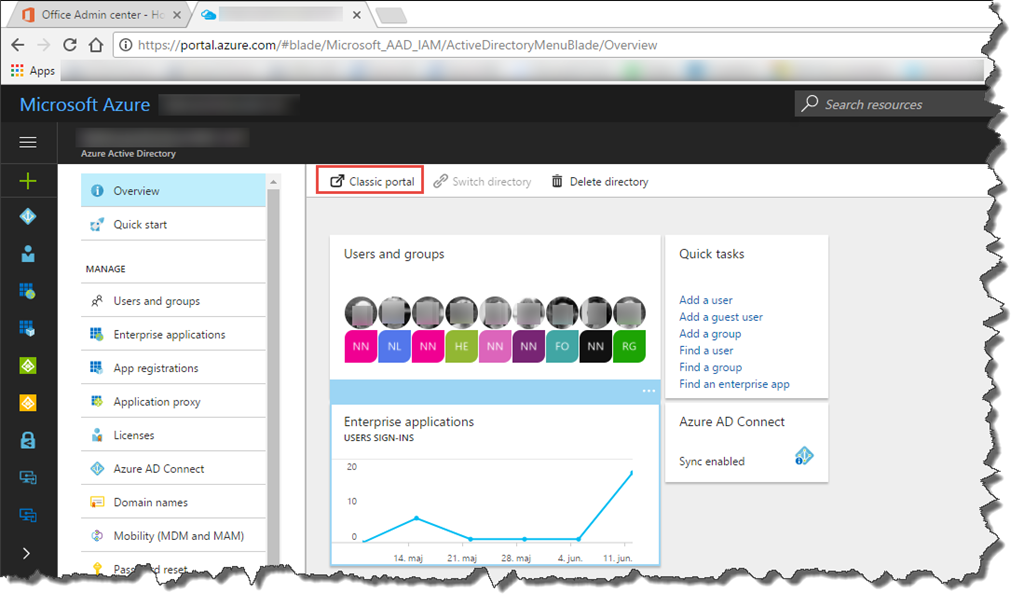
    During this period Microsoft has already announced the GA for Azure Active Directory, but there are still a few features that you need to configure in the classic Azure Portal. When you navigate to the Azure Active Directory node in the Azure Portal, you’ll find a link to the Classic Portal.
    SNAGHTML876c53c

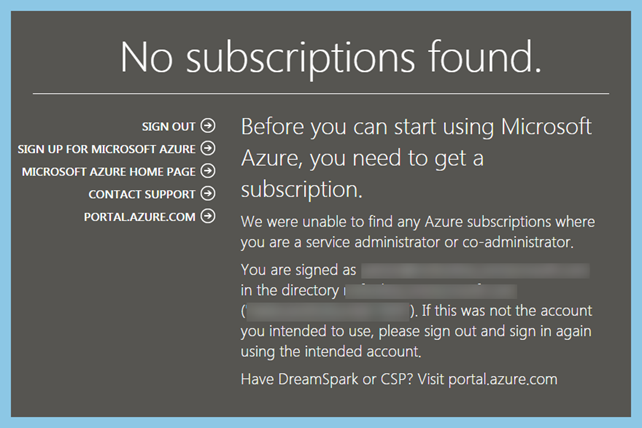
    Many of the customers that I’ve been working with, don’t have an “real” Azure Subscription. They just have Office 365, Enterprise Mobility + Security (EMS) and other licenses assigned by the CSP Partner. So if they try to use the link in the Azure Portal, they will get the following message: “No subscriptions found”.
    clip_image004

    The main problem here is that the Classic Azure Portal requires an active Azure subscription. And to sign up for the subscription the administrator needs to specify a credit card to validate the identity. Not many administrators are super excited about using their personal credit card.

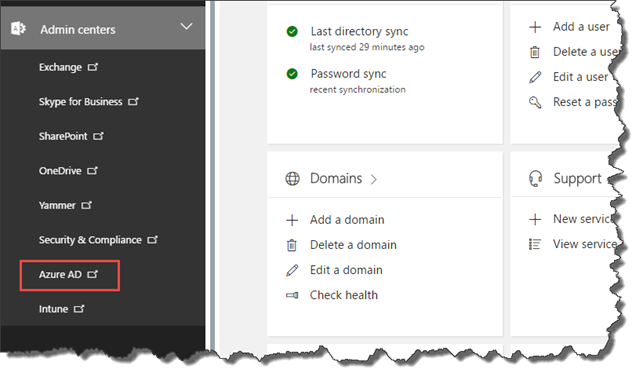
    Luckily there is already a “hidden” subscription assign to all office 365 subscriptions. We just need to get access to the subscription. To do this, simply navigate to the Office 365 Admin Center (https://portal.office.com/adminportal/home/). Expand “Admin centers”, and Click “Azure AD”.
    clip_image006

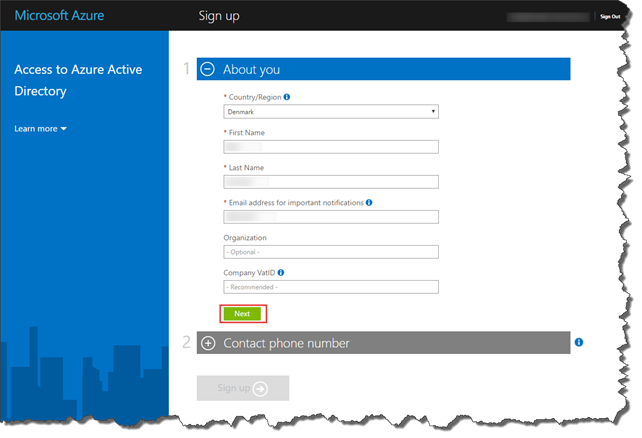
    This will launch the “Access to Azure Active Directory” wizard, that will allow the administrator to get access to the required subscription.
    clip_image008

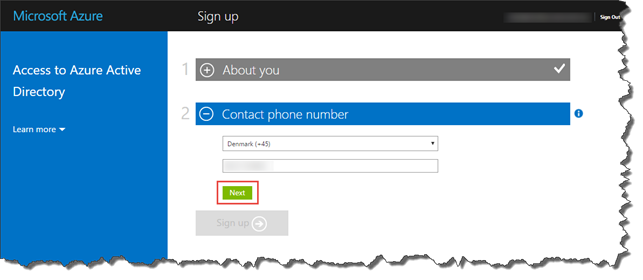
    All the required details should already be prepopulated, so all you need to do, is to verify all the details, and click Next.
    clip_image010

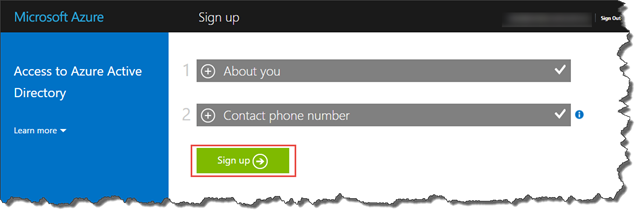
    Click Sign up, to complete the wizard.
    clip_image012

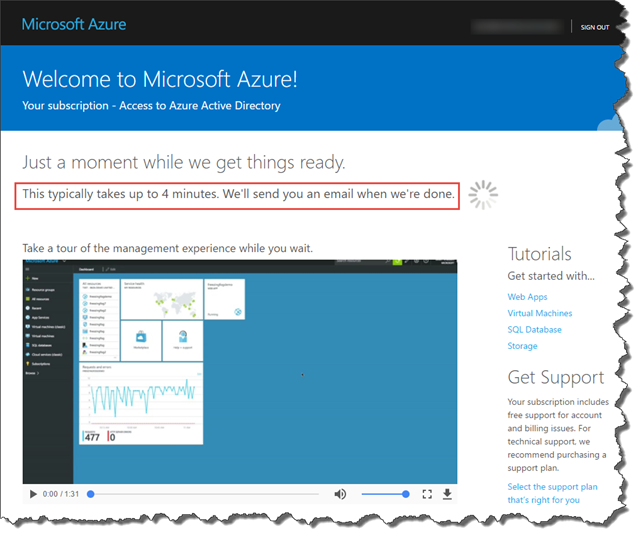
    It will take a few minutes to get everything ready, so go get that coffee now…
    clip_image014

    Sometimes you can even have an extra cup…

    clip_image016

    That’s it…

    clip_image018

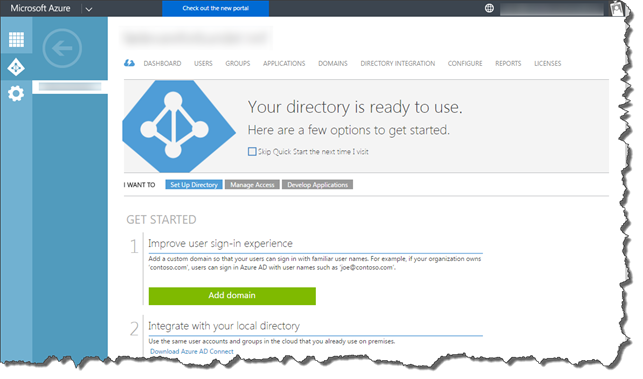
    And now you can open the Classic Azure Portal as expected.
    clip_image020

    Please note that you must do this for all the adminstrators that needs access to the Classic Azure Portal.

    /Enjoy
    +Ronni Pedersen

    • Tweet
    • Share 0
    • +1
    • LinkedIn 0

    Related

    Ronni Pedersen
    • Website
    • Facebook
    • X (Twitter)
    • LinkedIn

    My name is Ronni Pedersen and I'm currently working as a Cloud Architect at APENTO in Denmark. My primary focus is Enterprise Client Management solutions, based on technologies like AzureAD, Intune, EMS and System Center Configuration Manager. I'm is also a Microsoft Certified Trainer and Microsoft MVP in Enterprise Mobility.

    Related Posts

    Workplace Ninja User Group Denmark – April 2026 Meetup

    Workplace Ninja User Group Denmark March 2026 Meetup

    Workplace Ninja User Group Denmark February 2026 Meetup

    4 Comments

    1. Nils on June 14, 2017 07:44

      Do you know if this is only when you are licensed trough CSP?
      I see this issue for a free trail etc. as well, but then you receive a error message and still need to enter a credit card. Hopefully MS will change this behavior. Some admins close the screen there as they think they will create a new Azure AD tenant for them personally.

      Microsoft Azure
      Oops!
      Access to Azure Active Directory is not available.
      To obtain access to the Microsoft Azure portal, you will need to sign up for a trial Azure subscription.

      Reply
      • Ronni Pedersen on June 14, 2017 14:56

        It might only work for CSP… I’ll test it, and update the post if required.

        Reply
    2. Håvard Kristiansen on June 14, 2017 12:54

      Hi Ronni,

      I was exactly in this issue yesterday, but the workaround does not work from Norway. I also tried doing it on a virtual machine running in a Azure US datacenter with the same result.

      Reply
      • Ronni Pedersen on June 14, 2017 14:54

        I can’t really explain why this don’t work in Norway :-), but I’m not 100% sure if this workaround only applies for CSP customers.
        I’ll test it, and update the blog post if required.

        Reply
    Leave A Reply Cancel Reply

    This site uses Akismet to reduce spam. Learn how your comment data is processed.

    Follow
    APENTO

    Follow APENTO here:

    Subscribe to Blog via Email

    Enter your email address to subscribe to this blog and receive notifications of new posts by email.

    About
    My name i s Ronni Pedersen and I'm currently working as a Cloud Architect at APENTO in Denmark. My primary focus is Endpoint Management and Security, based on Microsoft technologies. I'm also a Microsoft Certified Trainer and a dual Microsoft MVP in both Security and Windows.
    Recent Posts
    • Workplace Ninja User Group Denmark – April 2026 Meetup
    • Workplace Ninja User Group Denmark March 2026 Meetup
    • Workplace Ninja User Group Denmark February 2026 Meetup
    • Successful Adoption of a “Cloud First” Strategy
    • Speaking at Nordic Virtual Summit
    Archives
    TOP POSTS
    • SCCM 2012: How does Automatic Client Upgrade work?
    • Installing SCCM 2012 SP2/R2 SP1 – Quick Start Guide
    • Microsoft Security Essentials available FREE to Small Businesses
    • Configuration Manager 2007 Service Pack 1 released
    • Microsoft Deployment Toolkit 2010 Update 1 vs. Modena
    RECENT COMMENTS
    • cOSHi on Missing “UserType” attribute in Azure AD
    • Gus on Pro Tip: Use Ctrl+Alt+D from the Azure Portal to get performance information
    • Sebi on Prepare for Co-Management: Migrate Intune Devices without user affinity
    • Vadim P on SCCM: Failed to Get Client Identity (80004005)
    • TM on Active Directory Based Activation in an multi domain environment
    DISCLAIMER
    The content on this website is presented "as-is" with no guarantees. The use of scripts from this website is at your own risk. Always test before putting something in production! Opinions expressed are my own.
    © 2026 ThemeSphere. Designed by ThemeSphere.

    Type above and press Enter to search. Press Esc to cancel.