Close Menu
    Facebook X (Twitter) Instagram
    Trending
    • Workplace Ninja User Group Denmark – April 2026 Meetup
    • Workplace Ninja User Group Denmark March 2026 Meetup
    • Workplace Ninja User Group Denmark February 2026 Meetup
    • Successful Adoption of a “Cloud First” Strategy
    • Speaking at Nordic Virtual Summit
    • Workplace Ninja User Group Denmark February Meetup
    • Workplace Ninja User Group Denmark Meetup – May 2022
    • Workplace Ninja User Group Denmark Meetup – April 2022
    RONNIPEDERSEN.COM
    • Home
    • Enterprise Mobility
      • Configuration Manager
      • Identity and Access
      • Information Protection
      • Intune
    • Cloud and Data Center
      • Data Center Management
      • Group Policy
      • Enterprise Security
      • Hyper-V
      • PowerShell
    • Guides
    • Webcasts
    • Links
    • About
      • Contact me
      • Disclaimer
    RONNIPEDERSEN.COM
    You are at:Home»Enterprise Mobility»Configuration Manager»SCCM/ConfigMgr Current Branch update 1702 available

    SCCM/ConfigMgr Current Branch update 1702 available

    1
    By Ronni Pedersen on March 27, 2017 Configuration Manager, Enterprise Mobility, Intune

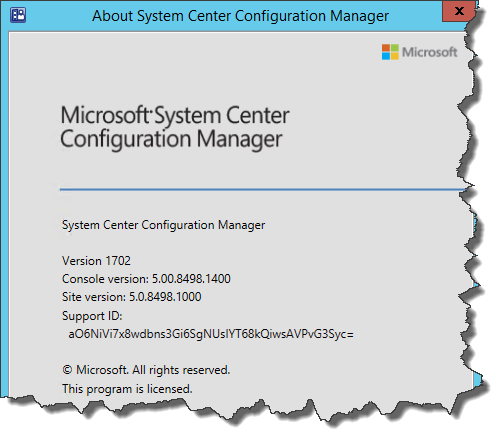
    Just like David James announced at the System Center User Group Meeting in Copenhagen last week, Microsoft has now announced the availability of the the next release of System Center Configuration Manager ( Update 1702). This update is available as an in-console update for previously installed sites that run version 1511, 1602, 1606, or 1610 which includes some great new features and product enhancements.

    For more information, check the “What’s new in version 1702 of System Center Configuration Manager”:
    https://docs.microsoft.com/en-us/sccm/core/plan-design/changes/whats-new-in-version-1702.
    SNAGHTML19d95c6f

    If you want to see a complete list of all the SCCM /ConfigMgr builds/versions, check out this updated blog post:
    https://www.ronnipedersen.com/2014/07/25/configmgr-2012-versionbuild-numbers/

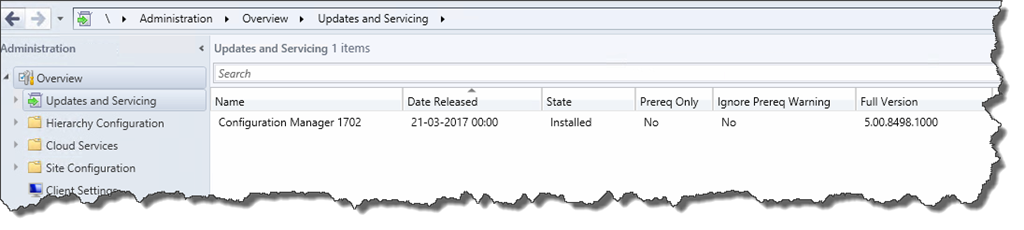
    The 1702 update is rolled out globally in the coming weeks, and it will be automatically downloaded. When the update is ready, Admins will be notified when they launch the console. The update can then be installed directly from the “Updates and Servicing” node in the Configuration Manager console.
    SNAGHTML19db1886

    If you can’t wait (like me), you can enable “fast ring” for the 1702 update, by running this PowerShell script on your Site Server: https://gallery.technet.microsoft.com/ConfigMgr-1702-Enable-c20180fd. After running the script, you should see the update available in your console right away.

    Still on Windows Server 2008 /2008 R2 ?

    Yellow road warning sign , The End is Near , 3d render

    This release is the next “current branch” of the product, and is supported by Microsoft for one year. This is also the first release that will drop support for Windows Server 2008 and 2008 R2 for all site server roles except for the Distribution Point role. The support for Windows Server 2008 is a “hard blocker”! For Windows Server 2008 R2 it will give you a “soft block” (a warning). But either way, if you install the update on one of these operating systems, you’ll be on your own (no support).

    /Enjoy
    +Ronni Pedersen

    • Tweet
    • Share 0
    • +1
    • LinkedIn 0

    Related

    Ronni Pedersen
    • Website
    • Facebook
    • X (Twitter)
    • LinkedIn

    My name is Ronni Pedersen and I'm currently working as a Cloud Architect at APENTO in Denmark. My primary focus is Enterprise Client Management solutions, based on technologies like AzureAD, Intune, EMS and System Center Configuration Manager. I'm is also a Microsoft Certified Trainer and Microsoft MVP in Enterprise Mobility.

    Related Posts

    Speaking at Nordic Virtual Summit

    Workplace Ninja User Group Denmark February Meetup

    Speaking at Modern Endpoint Management Summit 2022

    1 Comment

    1. Nicholas on April 8, 2017 09:27

      Any news if MBAM will be supported beyond version 1606 of SCCM?

      Reply
    Leave A Reply Cancel Reply

    This site uses Akismet to reduce spam. Learn how your comment data is processed.

    Follow
    APENTO

    Follow APENTO here:

    Subscribe to Blog via Email

    Enter your email address to subscribe to this blog and receive notifications of new posts by email.

    About
    My name i s Ronni Pedersen and I'm currently working as a Cloud Architect at APENTO in Denmark. My primary focus is Endpoint Management and Security, based on Microsoft technologies. I'm also a Microsoft Certified Trainer and a dual Microsoft MVP in both Security and Windows.
    Recent Posts
    • Workplace Ninja User Group Denmark – April 2026 Meetup
    • Workplace Ninja User Group Denmark March 2026 Meetup
    • Workplace Ninja User Group Denmark February 2026 Meetup
    • Successful Adoption of a “Cloud First” Strategy
    • Speaking at Nordic Virtual Summit
    Archives
    TOP POSTS
    • Deploying Office 2016 using the Click-to-Run Deployment Tool
    • SCCM 2012 - Offline Service for OS Images
    • How to Access the MBAM BitLocker Recover Keys directly in SQL
    • Unleash the Power of MDT 2010 Lite Touch, November 23-24
    • Seattle here we come…
    RECENT COMMENTS
    • cOSHi on Missing “UserType” attribute in Azure AD
    • Gus on Pro Tip: Use Ctrl+Alt+D from the Azure Portal to get performance information
    • Sebi on Prepare for Co-Management: Migrate Intune Devices without user affinity
    • Vadim P on SCCM: Failed to Get Client Identity (80004005)
    • TM on Active Directory Based Activation in an multi domain environment
    DISCLAIMER
    The content on this website is presented "as-is" with no guarantees. The use of scripts from this website is at your own risk. Always test before putting something in production! Opinions expressed are my own.
    © 2026 ThemeSphere. Designed by ThemeSphere.

    Type above and press Enter to search. Press Esc to cancel.