
Why this post?
I often get questions on requirement rules and global expressions, so I thought I’d make a blog post to explain some of the things you might need to consider, before you choose what strategy and method you want use, and also what kind of reporting you need.
Introduction
When deploying applications in System Center 2012 Configuration Manager (SCCM 2012), requirement rules are often used to determine what deployment type are to be used in the current scenario. But even if the application only have a single deployment type, I still recommend to use requirement rules to reduce the risk of deployment failure. An example could be if a new client OS hasn’t been tested yet, or the lack of resources like disk space or memory.
All applications has their own specific requirements, but most likely you can easy define a minimum requirement that defines a standard for what you test all company applications on. This will help you to reduce the risk of blowing up a client, and make the user unhappy.
Normally I recommend customers to create a baseline for all common deployment scenarios. For example one for Servers and one for Workstations.
Standard Workstation (example)
- Free disk space: At least 500 MB
- Memory: At least 2048 MB
- Operating System: Windows 7 OR Windows 8
Standard Server (example)
- Free disk space: At least 2000 MB
- Memory: At least 2048 MB
- Operating System: Windows Server 2008 R2 OR Windows Server 2012
These requirement rules can be added to the deployment type directly, or we could create a new global expression. A global expression contains a logical grouping of different global conditions and their values, so you can add the global expression as a requirement rule without having to remember the baseline every time you create a new application or deployment type.
Another great thing about global expressions is, that you can change the value on multiple applications, just by editing the global expression. So when you decide that Windows 8 is now supported, you just add Windows 8 to the global expression.
But what if my application have a more restrict requirement to one of the values? Like a requirement for more disk space?
If you add more requirement rules they are “AND” rules, so all requirements must be compliant. So a requirement rule for the “Standard Workstation” with 500 MB and another requirement for disk space greater than 2000 MB, will both be valid (assuming the client has +2000 MB free disk space), but it will fail if we only 1500 MB free.
Monitoring/Reporting
But when it comes to monitoring the deployment where status are “Requirement not meet”, the result view in the console is not the same, so you have to decide what’s most important for you and your business.
In the two following examples I’ve deployed the same application/deployment type to a client. In the first example I’ve used standard requirement rules, and the second example I’ve created a global expression with the same value.
Example 1: A Deployment Type with 2 requirement rules
The first one will be not compliant (red arrow), and the second one will be compliant (green arrow).
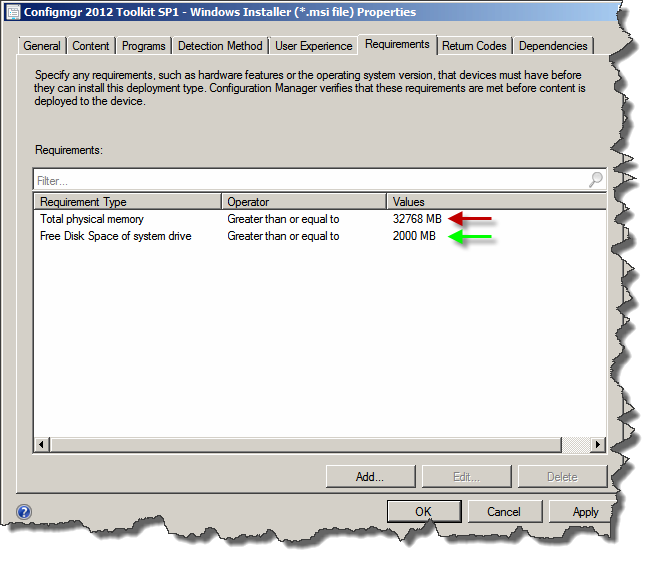
When I deploy this application to my test client (my site server), I see the following result in the console:
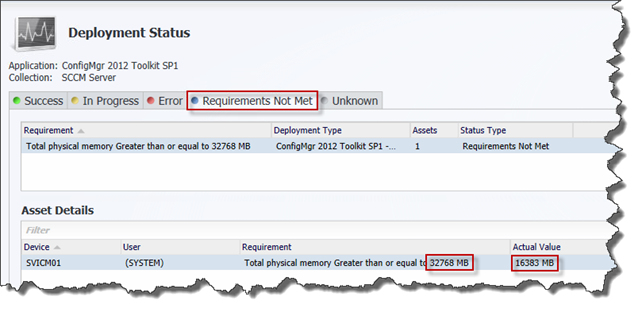
As you can see it’s easy to identify why this client don’t meet the requirements.
Example 2: Same Deployment Type with a single global expression
First we need to create the global expression.
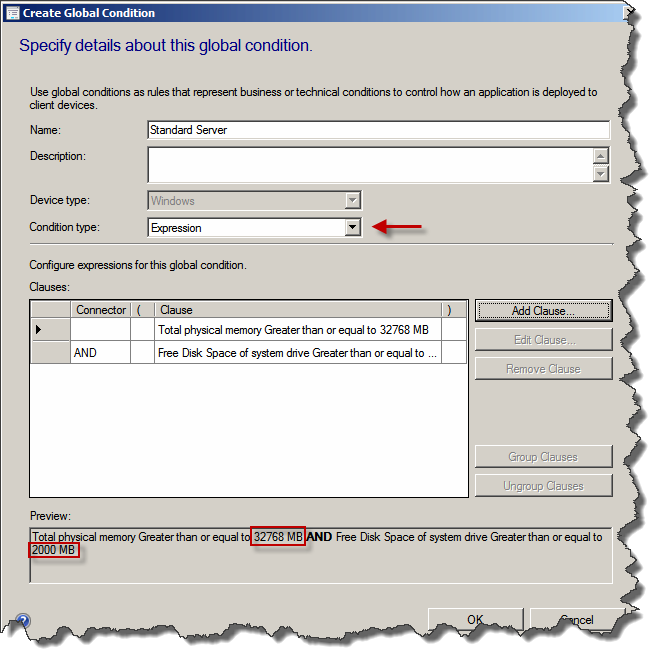
And then change the requirement of the existing deployment type to use the newly created global expression:
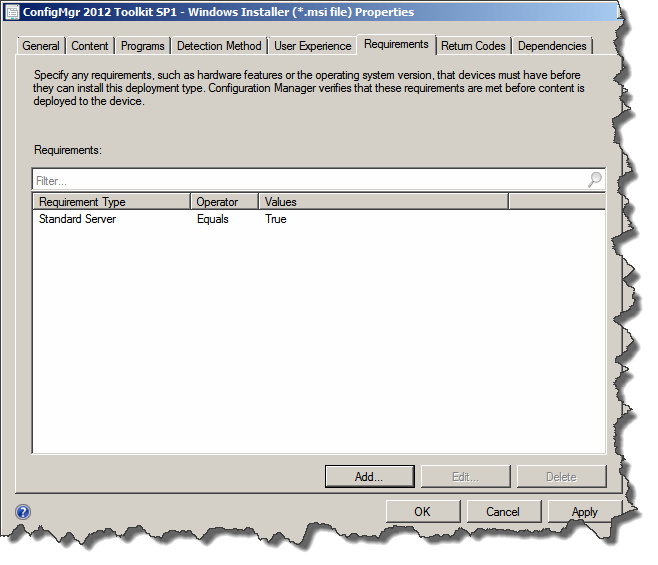
After updating the status (this can be done by running the “Application Deployment Evaluation Cycle” on the client, we now see the following result:
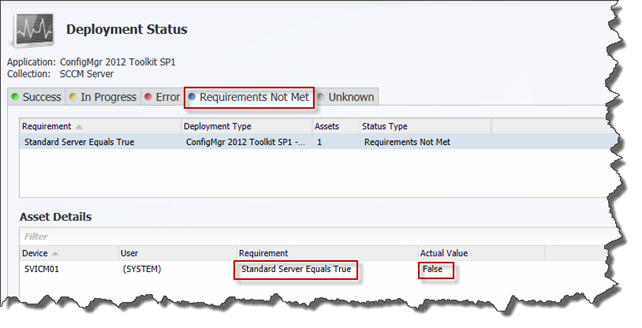
But we only see the summarized value of the global expression, and we still need to figure out what value is causing this application to be ”not compliant”.
If we then select the device, and click more details, we’ll get the following result:
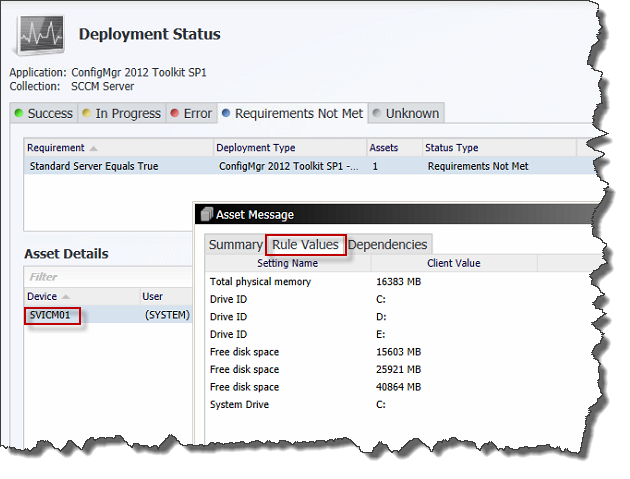
As we can see, we get the result of all settings that was evaluated, but there is no indication of which of the settings is the problem.
In most scenarios you would know what the result should be, but I’d like to see the problem identified here, and hopefully it’ll be fixed in some future release of the product.
Summary
What method should we use then?
It depends… On your requirements and what kind of “in-console” reporting you need. There is no “one-size-fits-all”, but everyone should be able to find a way, that supports that fits their needs.
Enjoy.

4 Comments
Only one word
Superb!!!!!!!!!!!!!!!!!
Pingback: SCCM 2012: Standard Requirement Rules vs. Global Expressions | sccm road
Pingback: SCCM 2012 | Online guide for "software distribution" | Fair Technologies
Pingback: RONNIPEDERSEN.COM Links from MS-10474D Class - RONNIPEDERSEN.COM