Close Menu
    Facebook X (Twitter) Instagram
    Trending
    • Workplace Ninja User Group Denmark March 2026 Meetup
    • Workplace Ninja User Group Denmark February 2026 Meetup
    • Successful Adoption of a “Cloud First” Strategy
    • Speaking at Nordic Virtual Summit
    • Workplace Ninja User Group Denmark February Meetup
    • Workplace Ninja User Group Denmark Meetup – May 2022
    • Workplace Ninja User Group Denmark Meetup – April 2022
    • Speaking at Modern Endpoint Management Summit 2022
    RONNIPEDERSEN.COM
    • Home
    • Enterprise Mobility
      • Configuration Manager
      • Identity and Access
      • Information Protection
      • Intune
    • Cloud and Data Center
      • Data Center Management
      • Group Policy
      • Enterprise Security
      • Hyper-V
      • PowerShell
    • Guides
    • Webcasts
    • Links
    • About
      • Contact me
      • Disclaimer
    RONNIPEDERSEN.COM
    You are at:Home»Uncategorized»Software Update Manager: Unable to Create Folders

    Software Update Manager: Unable to Create Folders

    0
    By Ronni Pedersen on February 28, 2013 Uncategorized

    Role Based Administration is a really great feature in System Center 2012 Configuration Manager, and to make it easy for us, Microsoft has prepared 14 built-roles.

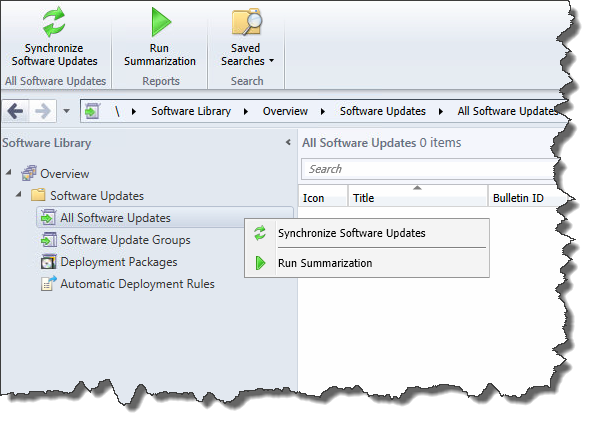
    But if we use the the built-in role for “Software Update Manager”, the option to create folders and move objects to these folders are not available by default. Not sure if this is by design or just a minor bug.

    Full Administrator:
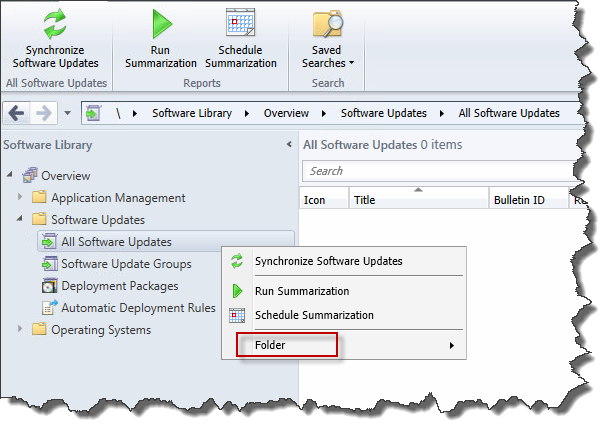
    SNAGHTML11d2faee

    Software Update Manager:

    SNAGHTML11d49a39

    To fix this small issue we need to create a new custom role. Just right-click the built-in Software Update Manager role, and click Copy.

    Give the new security role a name like “Custom Software Update Manager” and add the following permissions to the role:

    Configuration Item
    Modify Folder; Move Object

    SNAGHTML24b77c

    That’s it. Enjoy.

    +Ronni Pedersen

    • Tweet
    • Share 0
    • +1
    • LinkedIn 0

    Related

    Ronni Pedersen
    • Website
    • Facebook
    • X (Twitter)
    • LinkedIn

    My name is Ronni Pedersen and I'm currently working as a Cloud Architect at APENTO in Denmark. My primary focus is Enterprise Client Management solutions, based on technologies like AzureAD, Intune, EMS and System Center Configuration Manager. I'm is also a Microsoft Certified Trainer and Microsoft MVP in Enterprise Mobility.

    Related Posts

    Successful Adoption of a “Cloud First” Strategy

    Workplace Ninja User Group Denmark Meetup – May 2022

    Azure AD: Authentication Administrator Role is now available

    Leave A Reply Cancel Reply

    This site uses Akismet to reduce spam. Learn how your comment data is processed.

    Follow
    APENTO

    Follow APENTO here:

    Subscribe to Blog via Email

    Enter your email address to subscribe to this blog and receive notifications of new posts by email.

    About
    My name i s Ronni Pedersen and I'm currently working as a Cloud Architect at APENTO in Denmark. My primary focus is Endpoint Management and Security, based on Microsoft technologies. I'm also a Microsoft Certified Trainer and a dual Microsoft MVP in both Security and Windows.
    Recent Posts
    • Workplace Ninja User Group Denmark March 2026 Meetup
    • Workplace Ninja User Group Denmark February 2026 Meetup
    • Successful Adoption of a “Cloud First” Strategy
    • Speaking at Nordic Virtual Summit
    • Workplace Ninja User Group Denmark February Meetup
    Archives
    TOP POSTS
    • How to Access the MBAM BitLocker Recover Keys directly in SQL
    • Missing “UserType” attribute in Azure AD
    • SCCM 2012 R2: Where is the SMSTS.log located?
    • SCCM: Failed to Get Client Identity (80004005)
    • SQL Report Builder; Unable to connect to data source
    RECENT COMMENTS
    • cOSHi on Missing “UserType” attribute in Azure AD
    • Gus on Pro Tip: Use Ctrl+Alt+D from the Azure Portal to get performance information
    • Sebi on Prepare for Co-Management: Migrate Intune Devices without user affinity
    • Vadim P on SCCM: Failed to Get Client Identity (80004005)
    • TM on Active Directory Based Activation in an multi domain environment
    DISCLAIMER
    The content on this website is presented "as-is" with no guarantees. The use of scripts from this website is at your own risk. Always test before putting something in production! Opinions expressed are my own.
    © 2026 ThemeSphere. Designed by ThemeSphere.

    Type above and press Enter to search. Press Esc to cancel.